





%%Panel._Plex_Notice%%
%%Panel._Plex_PlexDBZ%%
%%Panel._Plex_Bundle_Disclaimer%%
Thanks in part to AllFightSticks - makers of incredibly durable steel FightStick enclosures - you can now own a Noir version of the ever-popular Razer Panthera.
Save Over Purchasing Separately
This discounted bundle includes your replacement panel, FA SO.CD Cleaner PCB and wiring for Hori. Additionally, you can also fully custom artwork, and plexi with HitBox direction and button labels, etched text and partial etched graphic. Finally, you'll score special bonus items such as the Buttercade SnapOuts for 24mm and 30mm. All are valued separately at over $85.
- Allfightsticks Razer Panthera Noir Replacement Panel ($34.95 Value)
- Custom Etch Plexi Cover for Razer Panthera Noir Replacement Panel with console labels and partial etch ($23.95 Value)
- Buttercade SnapOut Button Tools: 30mm and 24mm ($15.95 Value)
- Custom Printed Artwork ($14.95 Value)
- Choice of Color Anodized Hex Screws + 2.5mm Long Arm Hex Key) ($4.25 Value)
- Brillianize Instant Detailer Pack For Plexiglass ($1.95 Value)
Designed for Razer Panthera
The replacement panel will fit the Razer Panthera. Please note that this does NOT include the newer Panthera EVO model, which cannot accomodate a plexi swap.
%%Panel._Plex_Models_PANTHERA_NR%%
Installation Instructions for Joystick Mounting Plate
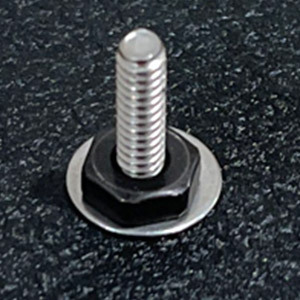
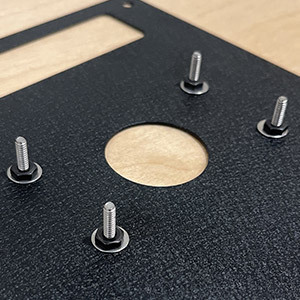
Typically, AFS provides the mounting screws pre-installed into the panel. At this time, the mounting screws are separated from the panel and will require assembly. AFS has provided us with the mounting screws, nuts and 8mm driver. The instructions below will assist in installing the screws. Watch this YouTube video for the full installation. 
 |
 |
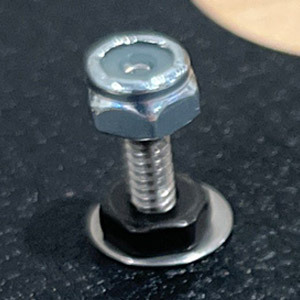 |
| Step 1: Install screw into the top metal panel's joystick mounting space. Next, install the silver washer, then black nut on the opposite side of the panel. | Step 2: Repeat steps for the remaining 3 mounting screw holes. Tighten black nut to keep in place. | Step 3: Install lever, then begin screwing each silver locknut to the silver screw. Use the 8mm nut driver to lower the locknut driver down towards the lever mounting plate. This will keep the lever in place. |
%%Panel._AFS_Durable%%
%%Panel._Plex_Tabs_Artwork%%
2 Reviews Hide Reviews Show Reviews
Write a Review

AllFightSticks
Razer Panthera Noir Custom Art/Plexi Bundle
-
Art for Hori N
Very durable very nice fit comes with everything you need and more to convert your razer panthera to a noir layout I own the all button version and the noir building was very simple Andrew Lopez on Jun 22nd 2024
-
Great product and customer service!
The product is amazing, there was a small error in the thickness of the plexi that was originally sent out. But that was very quickly resolved by the FocusAttack team. I highly recommend anyone to buy this with confidence if you’re thinking of getting this. Erick on Oct 7th 2022
